Update and export leads
Apply an action to selected leads or download the current lead list.
Use table selection when the same action applies to several leads.
Update selected leads
Open Leads in Table view.
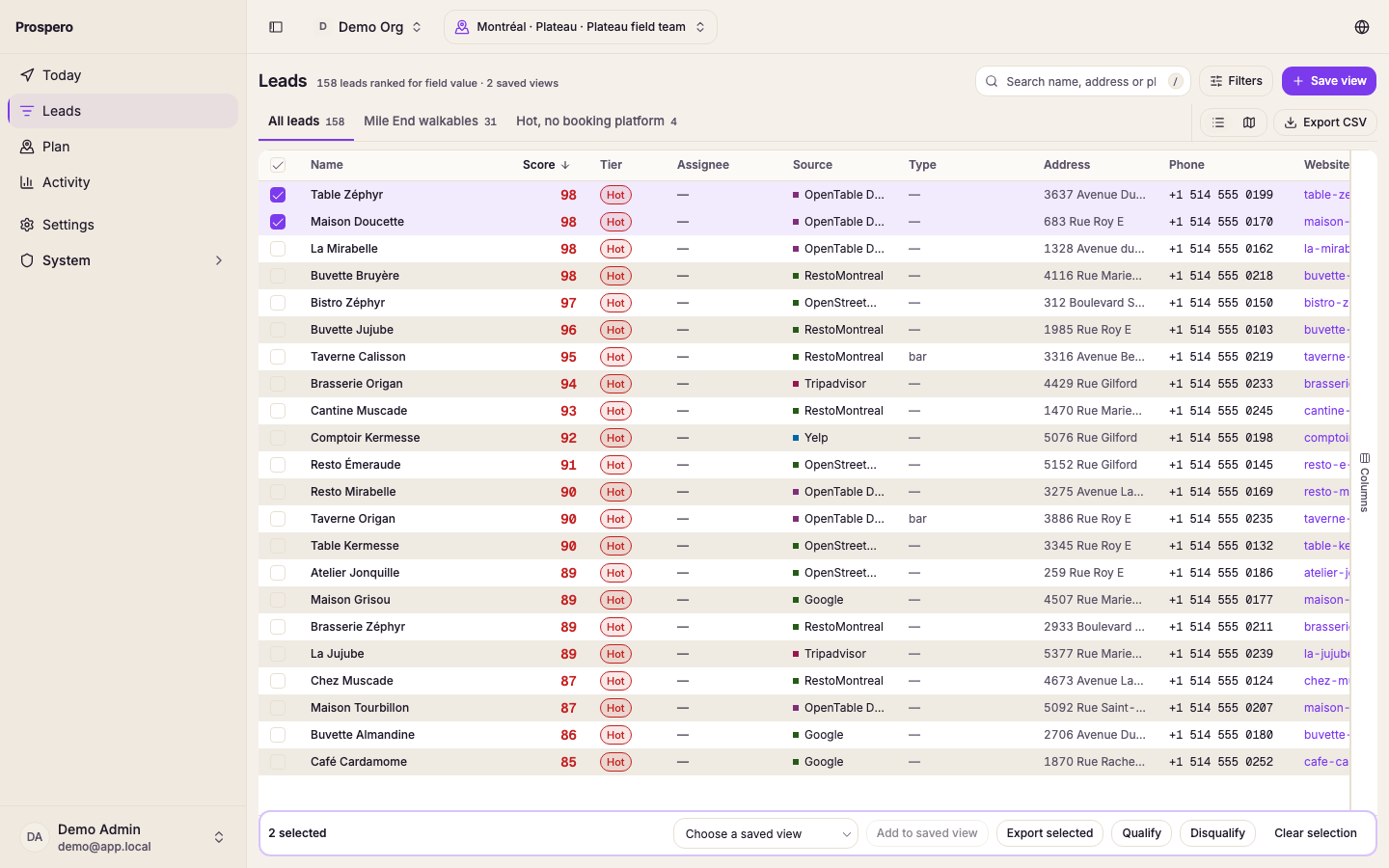
Select the checkbox beside each lead, or the checkbox in the header row to take the whole page.
Read the count in the selected-leads bar. It says what you picked by tier, for example "12 selected: Hot 4, Warm 8".
Choose Qualify or Plan calls in the bar, or open More for Disqualify, Add to saved view and Export selected.
Wait for the confirmation message before clearing the selection.
Plan calls opens the call planner with up to 200 leads, the first ones in the order the list is sorted. When you picked more, the button says so before you select it, for example "Plan calls (first 200 of 312)". Leads with no phone number, or that are not a prospect, are skipped.
Add to saved view lists your organization's saved views. A view that already holds every lead you picked is checked and listed last. Only owners and admins can add leads to a saved view.
To see which saved views hold one lead, open it and look at In views, last in the panel. Owners and admins check a view to add the lead to it, or uncheck it to take the lead out.
Act on every matching lead
Select the checkbox in the header row to take the whole page.
When the list holds more leads than the page shows, select Select all N matching in the selected-leads bar. Every lead your search, filters, and saved view match is now selected. Uncheck a row to leave it out.
Select Qualify or Plan calls, or Disqualify under More.
The confirmation counts what changed, for example "409 leads qualified." Excluded leads are never qualified, so the message also says how many were skipped.
Select Undo in the confirmation to put each lead back the way it was. A lead someone changed since is left alone, and the message says how many were skipped.
Add to saved view and Export selected work on checked rows only, not on every matching lead.
Up to 1,000 leads change at once. Above that, an owner or admin can run Qualify as a job or Disqualify as a job. A job runs in the background, shows its progress in Activity, and cannot be undone.
Export the current result
Apply the search, filters, and saved view you want included.
Select More at the top right, then Export CSV.
Open the downloaded CSV file from your browser’s downloads.
Use Export selected, under More in the selected-leads bar, when you need only the checked rows, up to 1,000 at a time. Use Export CSV when you need every lead in the current result, across every page. The file follows the search, filters, and saved view you have open, so a view with no leads has nothing to export and the item stays off.
Both exports match the table you are looking at:
- The file has the columns the table shows, in the same order. Hide or move a column first to change the file.
- Rows come in the table's sort order.
- Column headers are in the language the app is set to.
While the file is being prepared, the button reads Exporting. Large views can take a few seconds.