Connect a CRM
Connect HubSpot or Attio, then send your qualified leads to it.
Prospero works with two CRMs, HubSpot and Attio. Each has its own card on Settings, Integrations, External CRM, and the connection is shared by the whole organization. An organization connects one of them at a time: to switch, disconnect the current CRM first. Connect HubSpot to sync leads both ways, or Attio to push each market's qualified leads into your Attio workspace.
Before you start
You need owner or admin access. External CRM is not in a member's settings, and opening its address takes a member to General. Coordinate with another admin before disconnecting or replacing an active organization connection.
Connect HubSpot
Open External CRM
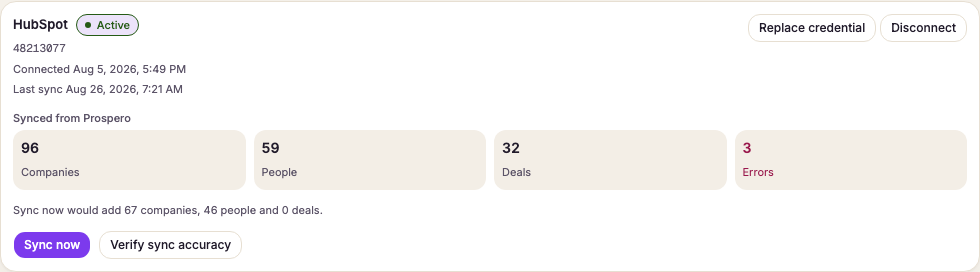
Open Settings, then select External CRM under Integrations. The CRM card shows the current provider and connection status.
Choose how to connect
If you see the HubSpot approval message, select Connect. To use a token instead, select Use an access token instead.
Enter an access token when required
Paste a current token into HubSpot access token, then select Connect. Skip this step when HubSpot opened its approval page.
Confirm the connection
Complete the HubSpot approval page when it opens. Wait for the card to show Connected. A rejected token is not saved, so check its access and try again.
After connecting, save the HubSpot sync policy.
Connect Attio
Create an access token in Attio
In Attio, open Workspace settings, then Developers, and create an access token. Give it read and write access to records, lists, objects and list entries. Copy the whole token.
Connect the token
On the Attio card, paste the token into Attio access token and select Connect. The card shows Connected and the workspace name. A token Attio refuses, or one missing some of that access, is not saved, and the card says which.
Prepare the workspace
Workspace fields says what Prospero still needs in your workspace, one line per field: a field or a choice to add, or something only a person can fix. Select Prepare workspace. Prospero adds every field, choice and list it can, and restores the archived ones it added before, then reads the workspace again. The card shows Preparing with how far it got, and you can leave the page while it works. When nothing is left, the card says Your workspace has every field Prospero needs.
Fix what Prepare cannot
Prepare never changes a field's type or restores a field Attio itself owns, because that would change data your team already has in Attio. Each such line tells you what to do, for example to restore a field. If Prepare stopped before it finished, the card says so: select Prepare again to add the rest. Do it in Attio, then select Prepare workspace again to check. Runs open once the list is empty.
Every market you add later is a choice in Attio's Market field. Prospero adds that choice itself on the market's first run, so a new market needs no Prepare.
Push markets to Attio
Once the workspace is prepared, the card's Markets list holds one row per market. Each row shows how its last run went. Until the workspace fields are ready, the list says so, and no market can run.
Preview a market
Select Details on a market. Next run preview counts the leads a run would send (To send), the ones Already in Attio, the ones it would skip and why, and the ones it would retire (To retire), plus the restaurant groups it would send as parent companies. The preview reads Prospero only and changes nothing in Attio.
Run it now or on a schedule
Select Run now to push the market at once. A run sends new leads and the leads that changed since they were last sent, and skips the rest. Check Also resend leads that have not changed to send every lead again, for example after someone edited the records in Attio. Turn on Run on a schedule to let Prospero push the market on its own, once scheduled runs are on for your server. Until then the row says scheduled runs are paused, and Run now still works. One run works at a time per workspace, so the card names the market that is running until it finishes.
Read the last runs
Last runs lists each run, at the market's local time, with what it added, updated and retired, and the leads Attio refused. In progress, resumes means a scheduled run reached its time limit. The next run continues where it stopped.
When runs stop
A run that cannot work stops every market, so the next one does not fail the same way. If Attio refuses the token, the card's status reads Token refused and shows Reconnect: paste a working token to start again. If the run found workspace fields that are not ready, it shows Prepare workspace: select it, then fix in Attio what the Workspace fields list still names. The stop lifts once that list is empty. Run now stays hidden while runs are stopped.
When a run fails
The organization's owners and admins get one email when a market's run fails or finishes with refused records. It names the market and the one thing that fixes it, with a button to the Attio card. A failing streak sends one email, and the next comes only after a run succeeds and then fails again.
Disconnect Attio
Select Disconnect on the Attio card and confirm. Prospero stops pushing leads, forgets the token and turns every market's schedule off. Leads already in Attio stay there. Delete the token in Attio too, so nothing else can use it. When you connect again, the card reminds you that the schedules were turned off. Prepare the workspace and turn back on the ones you want under Markets.