Track customers and invoices
See every paying venue, who owes what and when it is due, and link an invoice Stripe could not match to its lead.
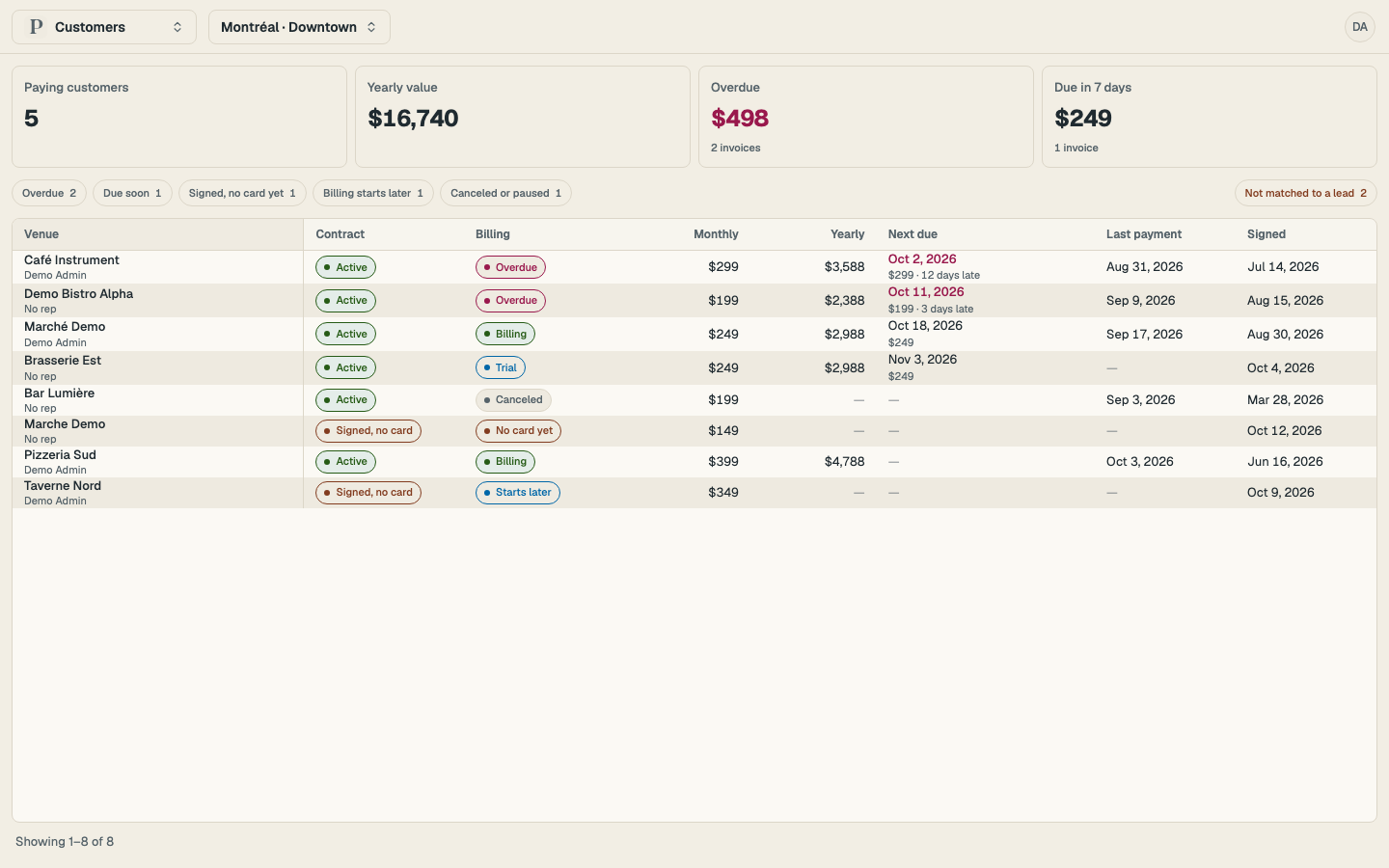
Once Apero contracts are connected, Customers ranks every signed or paying venue in one table: the overdue ones first, by days late, then the ones due soonest, then everyone else. Each row shows the contract and billing state, the monthly and yearly value, the next due date with the amount owed, the last payment and the signed date. Opening a venue shows every invoice with Stripe's page, the PDF and a Copy payment link.
Who sees it
Customers shows contract and payment amounts, so it is for managers and above. A rep does not see it in the menu. A customer success manager is invited as a manager; there is no separate role.
Read the book
Open Customers
Open Customers from the main menu. The four tiles at the top show paying customers, their yearly value, what is overdue and what comes due in the next 7 days. When your invoices are in more than one currency a tile shows the count instead of a total.
Filter the table
Select Overdue, Due soon, Signed, no card yet, Billing starts later or Canceled or paused. The Overdue and Due tiles are filters too. The market picker in the header scopes the table the same way it scopes Leads.
Open a venue
Select a row to open the lead. Its Invoices section lists each invoice with its period, amount, state, due date and paid date. Open in Stripe opens the hosted invoice page, PDF opens the document, and Copy payment link copies the hosted page's address for an open invoice so you can send it to the customer.
Link an invoice to its lead
An invoice whose Stripe customer Apero could not match to a lead sits under Not matched to a lead, with the customer name, email, amount, state and due date.
Open the group
Select Not matched to a lead above the table. The count beside it says how many invoices are waiting.
Pick the lead
Select Link to lead on the invoice, type the venue's name and pick it from the list. Every invoice of that Stripe customer moves to the lead, and future invoices for the customer land there too.
What the states mean
| Column | State | Meaning |
|---|---|---|
| Contract | Active | The agreement is live and billing |
| Contract | Signed, no card | The customer signed and has not added a payment method |
| Contract | Link sent, Viewed | The agreement is out for signature |
| Billing | Overdue | An open invoice is past its due date, whatever the subscription says |
| Billing | Starts later | The agreement's billing start is still ahead |
| Billing | Trial, Paused, Canceled, Card pending | Stripe's subscription state |
The dates and amounts follow your market's time zone and the invoice's own currency, in whole units.